Saturday, October 18, 2014

Jony Ive Talks About Values and Care in Design


A great interview, followed by an even better Q&A session with Jony Ive - a couple of highlights:
  • I was struck by his explanation of Apple's design process, and how the process changes gear when the design of a product get three-dimensional: "as soon as there's an object ... it really galvanizes and provides a focus to an entire team, and very often when they're struggling with these abstract, tentative ideas";
  • I enjoyed his description of a Braun food "mixer" (processor?) as "extraordinarily, achingly beautiful";
  • I got a little rush, as did the audience, when he described copy-catting as theft, and copy-cats like Xiaomi as "lazy";
  • I appreciated that Jony expressed his disdain for Augustus Pugin in the context of making products with care, and that that care is tangible.

Saturday, June 28, 2014

Smitten - A Science Experiment You Eat


My foodie cousin Aenoch is moving back to California after some years in North Carolina. We welcomed him back with a meal at Toast. During the meal, the conversation did, of course, drift to dessert, and Aenoch mentioned that he had gotten a machine and had been making his own ice cream. So we decided to head down the street to Smitten and give their ice cream a try.

The place is setup like a big science experiment - you are greeted by a large super-shiny tank of nitrogen. Next to that is the ordering stations and the menu board above. From the tank you notice a series of thick pipes covered in beautiful braided cable casings which feed down from some kind of pump or secondary tank above a distribution tray.


The nitrogen is sent down to a series of small mixer-like appliances where the ice cream "brrristas" mix your treat to order. Part food-processor and part Halloween atmospheric, these mixers (called Brrrs) quickly churn the ice cream base within a cloud of cold, one for each flavor being offered (they cannot mix flavors in a cone, as that would require making two batches).


The ice cream itself is served a bit on the soft side, but extra creamy, and full of flavor - reading some of the negative reviews on Yelp seem to confirm that if you don't like strong, clean ice cream flavors, you're not going to like Smitten's ice cream. I love it.

I've had the mint chip and the Tcho chocolate. The mint chip is like bruising a mint leaf under your nose and eating that smell cold; it's strong and sweet. It is not like the mint chip you get at the store; even a premium mint chip doesn't have this strong, clean flavor. The Tcho chocolate is based on a 60.5% cacao dark Tcho product, and they add some salt to bring it out.

There are lots of comparisons to Ici in the Yelp reviews, which is fair given the cost and wait time. The time at Smitten is spent waiting for your treat to actually be churned, and at Ici for the server to dig out the scoops from the tubs of rock-hard ice cream. I do love Ici, but they take the old fashioned "shoppe" and execute that at a really high level. Smitten is Bay Area high-tech, maker-culture meets slow food culture, and just plain nerdy.

I recommend the small cone, no toppings; it seems to offer the best bang for your buck. The cones are home-made, thick, wide, waffle-style - a bit soft and crumbly, so watch the last few bites, cause the stuff will spill out. The cookie-like taste and texture are great for the softer ice cream.

Admittedly, the cones at Ici are better - tall, narrow, crunchier, and with a plug of chocolate at the bottom to catch the drips (brilliant).

Sunday, April 20, 2014

MakerBot Replicator 2


A couple of years ago, MakerBot took a turn from making 3D printer kits and printers that looked like kits, to "mature products". It introduced the Replicator 2 in 2012, as their first real attempt to make a salable consumer product - for about $2200. The Replicator 2 got rave reviews and seemed to spark the market for "pro-sumer" devices, as the number of competitors seems to have swollen in the meantime. And this new class of devices has now found their way into homes and schools everywhere.

This year, MakerBot introduced their latest "5th generation" products, and the price for the Replicator 2 dropped to $1899 - too cheap to ignore. So I went to the Microsoft Store and grabbed one. Set it up, pushed some buttons, and it's very easy to get started - really impressive how easy it is to get started. I printed a couple sets of the nuts and bolts on the provided SD card. Piece of cake.

But there are nuances and issues. My idea is to teach a technology class as an art (architecture) class, so I tested the printer by printing a model of the house, and the steep, curvy contours of the landscape made a giant mess - the extruder never stops extruding, and drags a thread of plastic every time it has to "cross a valley", thus filling the valley. After the printer finished, I had to go back and clear out these threads, leaving lots of funny edges and bumps.


There is also an on-going balancing act going on in the hobbyist community between getting the plastic to adhere to the build plate during the printing process, and releasing the printed object when finished. It involves: blue painter's tape, kapton tape, isopropyl alcohol, acetone, hair spray, glue sticks and other household cleaners and chemicals - or some combination thereof. The basic process I've started with is to lay down blue painter's tape on the build plate (made of acrylic), and clean it with the alcohol between renderings.

The other battle going on is a search for a solution to the curling of the plastic as it cools. The nuts and bolts are about 3/4" in diameter, and I had no problem printing them directly on the build plate. When I first tried a larger print (4-in square base) without the tape, the plastic peeled up at the corners, and began rocking back and forth as the extruder crossed the area. The tape does not prevent the curling, but seems to keep the print job in place, holding the edges steady to get a better render.

I've also found that by turning the model in the software, you can get the extruder to cross the "valleys" in different ways, so it's worth checking the "print preview" to see which position gives the cleanest render.

Any way, there is much more "art" to this process than it might seem. Regardless, it's an amazing technology.

Bonus cool-thing for the weekend: Apple Maps now has Berkeley in 3D, and that includes our house (compare to the model above):


Saturday, March 22, 2014

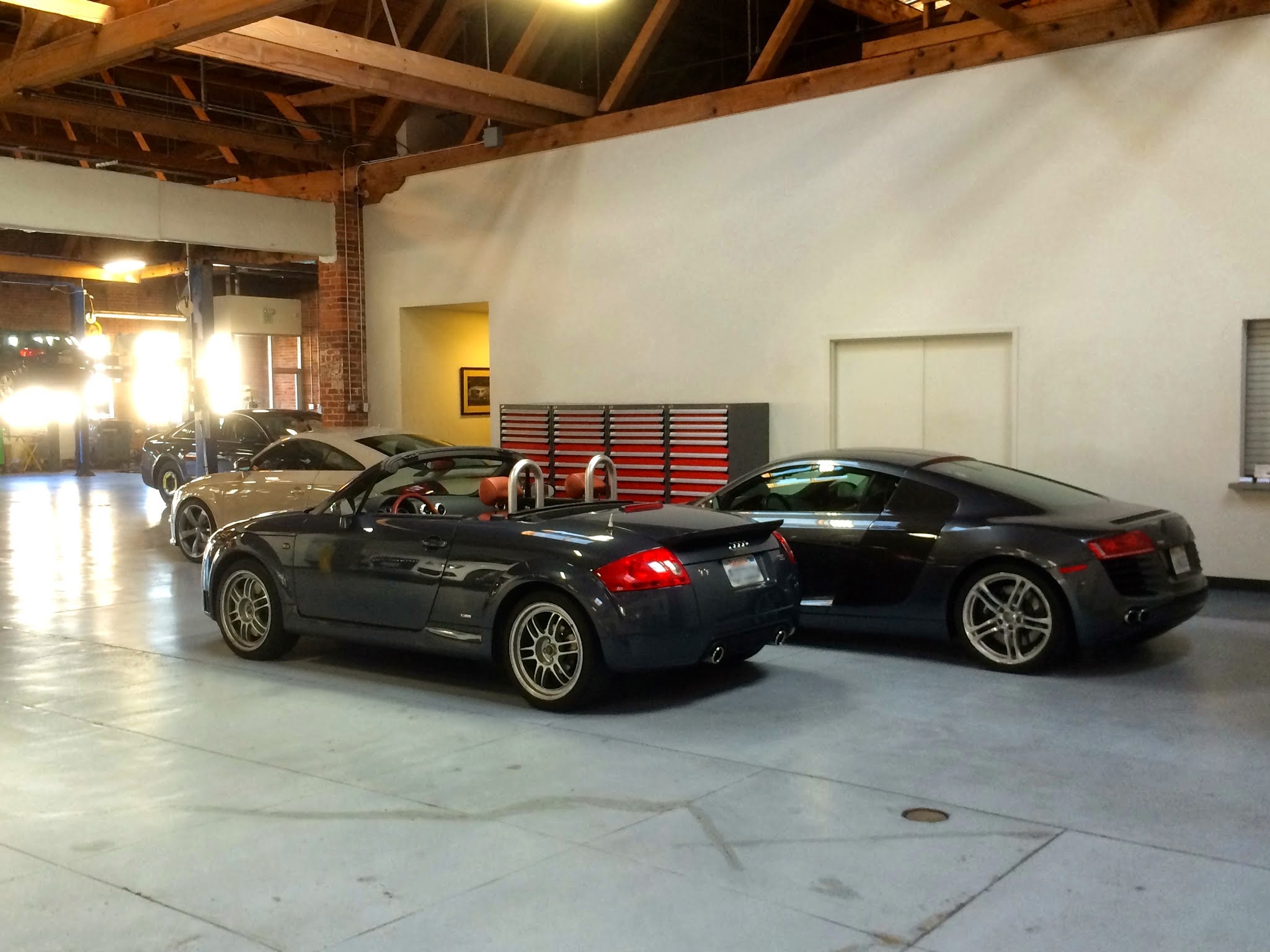
TT Turns Ten


I picked up the TT exactly ten years ago today - had a service appointment this morning so it got some birthday TLC. Here it is with some youngsters - the "latte" colored TT-RS has Schroth racing harnesses and looks seriously low to the ground; the R8 is a V8 with all the right touches (colors, wheels, blades). Just over 54,000 miles now and still smiling.

Here's a trip down memory lane - when the TT Turned Two.

Saturday, March 15, 2014

A Week of Science


Science is awesome. Scientists are awesome. I've been binge-watching Neil dGrasse Tyson YouTubes since Sunday.

On Sunday, Dr. Neil deGrasse Tyson hosted the re-launch of Cosmos, a beautiful re-visioning of Carl Sagan's 35-year-old original; both open on a sea cliff near Carmel, CA, so there's kind of a local connection. Dr. Tyson flew around in a little capsule that reminded me of a cross between Flight of the Navigator and Count Dooku's solar sailer from Star Wars (I don't recall seeing the outside of Sagan's ship): fantastic imagery and story-telling. Can't wait for episode 2. Way better than Downton.

On Monday, Dr. Randy Schekman, cell biologist and Nobel laureate, gave this year's Brizendine Visiting Scholars talk about protein secretions in yeast cells. Nerdy? You bet, but not unfathomable. Dr. Schekman traced the path of proteins thru a series of organelles inside a cell, and described the process he explored using yeast cells. I asked my co-worked what he thought, and he said, "He lost me." Hmm. Not a real nerd.

On Wednesday, Dr. Dan Siegel, psychiatrist and professor at UCLA and founder of the Mindsight Institute, spoke about being an adolescent. Speaking as he was to an audience full of adolescents, he carefully crafted a description of the adolescent brain and the changes in development of the various structures inside it. He used a kind acronym of "essence" - emotional spark, social engagement, novelty, and creative exploration to frame the areas of brain growth that are happening - not as nerdy, but illuminating for students and teachers alike.

Friday, January 24, 2014

30 Years of Mac


Happy birthday Macintosh. Here's the list of Macs (etc) I've called my own:
MacPlus (4MB RAM, 20MB HD, MacPack)
Outbound System Notebook (loaner)
Mac IIci
Mac Quadra 650 (with Radius VideoVision)
PowerBook 170
Newton Message Pad (original)
PowerBook 180c
Newton Message Pad 120
Pippin (developer edition)
PowerBook 3400c
eMate 300
Twentieth Anniversary Mac
PowerBook G3 Series
iBook (Tangerine)
PowerMac G4 (with Cinema Display)
PowerBook G3 (Pismo)
PowerBook G4
PowerBook G4 (DVI)
iPod (original)
iPod nano (gen 1)
PowerBook G4-15 (Al)
iPod shuffle (gen 1)
iPod video (black)
MacBook (polycarbonate, black)
AppleTV (original)
iPhone 3GS (black)
AppleTV (black)
MacBook Pro 15 (unibody)
iPad (original)
iPhone 4S (black)
MacBook Air
iPad (retina, black)
MacBook Pro 15 (retina)
iPad mini (black)
iPhone 5S (black)
Here's a video of the first "public" intro of the Mac at the Boston Computer Society on January 30th, 1984. The video reprises the well known intro at the Apple stockholders meeting on January 24th, and includes a terrific demo session and Q-A panel with key Mac team members, like Bill Atkinson and Andy Hertzfeld. It also captures the vibe of the tech community at the time. My own intro to the Mac was at the Rhode Island School of Design, as a student, when I helped install a small network of the first Macs for the Graphics Department - in a tiny Lab that was setup on the corner of Angell and Benefit, in a little building that used to hold the Housing Office. When I graduated in 1986, I went to work in Boston as an architect (in an office that had Macs), but joined the BCS and soon became an "Activist", teaching other members how to use the Mac, Microsoft Word, and other programs; and a "Sysop", helping to administer and run its bulletin board system (BBS).

Saturday, December 07, 2013

Pebble


My cousin Henry is a musician and world traveller. At dim sum the other day he turned and asked me: so where are we headed tech guy? And I said: wearable tech. Of course, I don't have Google Glass or even a Fitbit, so I'm not sure why I said that except that I've been reading about this trend.

Then Henry leaned over and showed me his UP band. We discussed his recent bike trip down the coast, and how he used his UP to track his progress. He showed me pictures from his phone and shared some great stories. So I guess wearable tech is not where we're headed - we're already there. And I'm kinda behind the times.

I do, of course, carry my iPhone with me, and on the iPhone I have an app that basically does a lot of what a fitness tracking wrist band does - it's a GPS pedometer app called Moves. I particularly enjoy when Moves gives me credit for cycling when I'm driving around town. Is it cause I have a convertible? But, boy, look how much I exercise - well, not much.

So I decided to take the next step and get a Pebble smart watch, which I've now had for about a week. The Pebble is a watch-like Bluetooth LE device that adds a kind of bonus display to your phone, and will vibrate when you get a text, a call, or an email. You can then see a small summary of your communication on the watchface. When it's not being an iPhone display, it's acts like a watch, so it doesn't seem like something "else" to wear.

I've already grown to love it and it kinda reminds me of the old days when I first got a Newton Message Pad. There's something a bit rough and kit-like about it that invites customization. And there's a thriving community doing the customizing. I particularly like a web site where you can make your own watch face - Watchface Generator for Pebble by Paul Rode. Fairly easy to waste hours fussing around here. Build your face by uploading a background, adding analog or digital clocks, and other things - then use a QR scanner like Red Laser to download the .pbw file to your phone, and use the Pebble app to load it via Bluetooth.  It's fun and easy.

Here are a couple I made (click the link to download the watchface):


The "Think Question Create" tag line is from the school where I work, Marin Academy.

So how is it working out? The convenience is that I no longer have to take my phone out of my pocket to see who's calling, or get a text or email (just the sender and subject line). That doesn't sound like a big deal, but it turns out it is - at least for me, and I would imagine for lots of folks who do IT work.

Out of the box, the Pebble will just display time and remote your music app. In order to get the additional communications functionality, you do have to add some extras: I am using an app called SmartWatch+. This app includes a tool to read your calendar, your texts, your emails, and grab weather info vis-a-vis your GPS. You then have to add a watch face or watch app that will display that info - they have one bundled, but I prefer these from MyPebbleFaces.com:


I find that while I'm running around campus, I usually have Smartface going. If the day is not too busy, I prefer the Futura display. At home I switch to a basic clock display like the ones above.

There's just a couple things. When I get a text, the watch vibrates and shows as much as it can in the display. When I get an email from one of two accounts that I have configured, the sender and subject line show up, but when I go to read more, it just says "Loading" and never loads (or I've never seen it finish loading - this happens on one of my Google accounts, but works fine on my iCloud account). And its odd that the watch will display the battery level of your phone, but so far, I have not figured out how to view the battery status of the watch itself.

I also find I don't have to dig out my phone to check if I messed something - my watch will know. The SmartWatch+ also includes some other apps which I have not yet explored: there is a weather forecast, a stock ticker, a more advanced music app, a complete calendar app. I have yet to load the camera app, the Bitcoin tracker (I'll never need that one, I hope), GPS screen, HTTP request screen, Find my Phone, and Reminders. Lots more to play with.

Unlike the fitness trackers, the Pebble does not collect much data, it just displays data you already have on your phone on your wrist. I stopped wearing a watch way back when I was an architect and I was still drawing on drafting tables with pencils (remember those?); when I was drawing I'd take off my watch then I'd forget it at the office. Later I was doing so much network stuff, I started wearing a beeper (remember those?) which had a time display, and I stopped wearing a watch completely. So we'll see how long this infatuation lasts.

UPDATE: Good read on WIRED on wearable tech.

UPDATE 2: Pebble releases new firmware v2.0 - here are the new watch faces for it: